
Measuring Lead Response Time Improvement With Automation: A Real Estate Investor’s Guide
What if automation makes your response-time dashboard look faster, but qualified conversations and booked opportunities stay flat? That’s the trap. Measuring lead response time improvement with automation means tracking more than the first reply. You need to know whether faster contact reaches the right leads and moves them forward.
Scattered timestamps, hidden delays, and simple averages can distort the picture. A quick reply on one channel can mask missed calls or leads that waited hours elsewhere. The fix is a clear baseline and a fair comparison, not a prettier report. This guide shows you how to define response time consistently, compare results before and after automation, and account for differences in lead channels, segments, and staffing.
You’ll also connect speed to outcomes that matter: successful contact, meaningful conversations, qualification, and booked opportunities. REI Reply supports calls, texts, emails, and social interactions, with CRM integration to help centralize lead activity for analysis. The goal isn’t to assume automation works. It’s to build evidence showing where response improves, where it doesn’t, and whether that speed creates real momentum.
Key Takeaways
- Set a consistent start and end point for response-time measurement so calls, texts, emails, and social inquiries can be compared fairly.
- Track median response time alongside the average to reveal delays that a single headline number can hide.
- Measure conversations, qualification, and booked opportunities alongside speed to see whether faster responses create meaningful progress.
- Make before-and-after comparisons more reliable by grouping similar lead sources and types, and recording significant staffing or workflow changes.
- Use a define, baseline, automate, compare, diagnose, and refine process for measuring lead response time improvement with automation.
Why measuring lead response time matters for real estate investors
A motivated seller might reach out through a website form, text, phone call, email, or social channel while you’re evaluating a property or speaking with another lead. If each channel records activity differently, it can be hard to tell where inquiries wait or whether anyone responded. Measuring lead response time improvement with automation starts by turning those scattered events into one consistent operational measure.
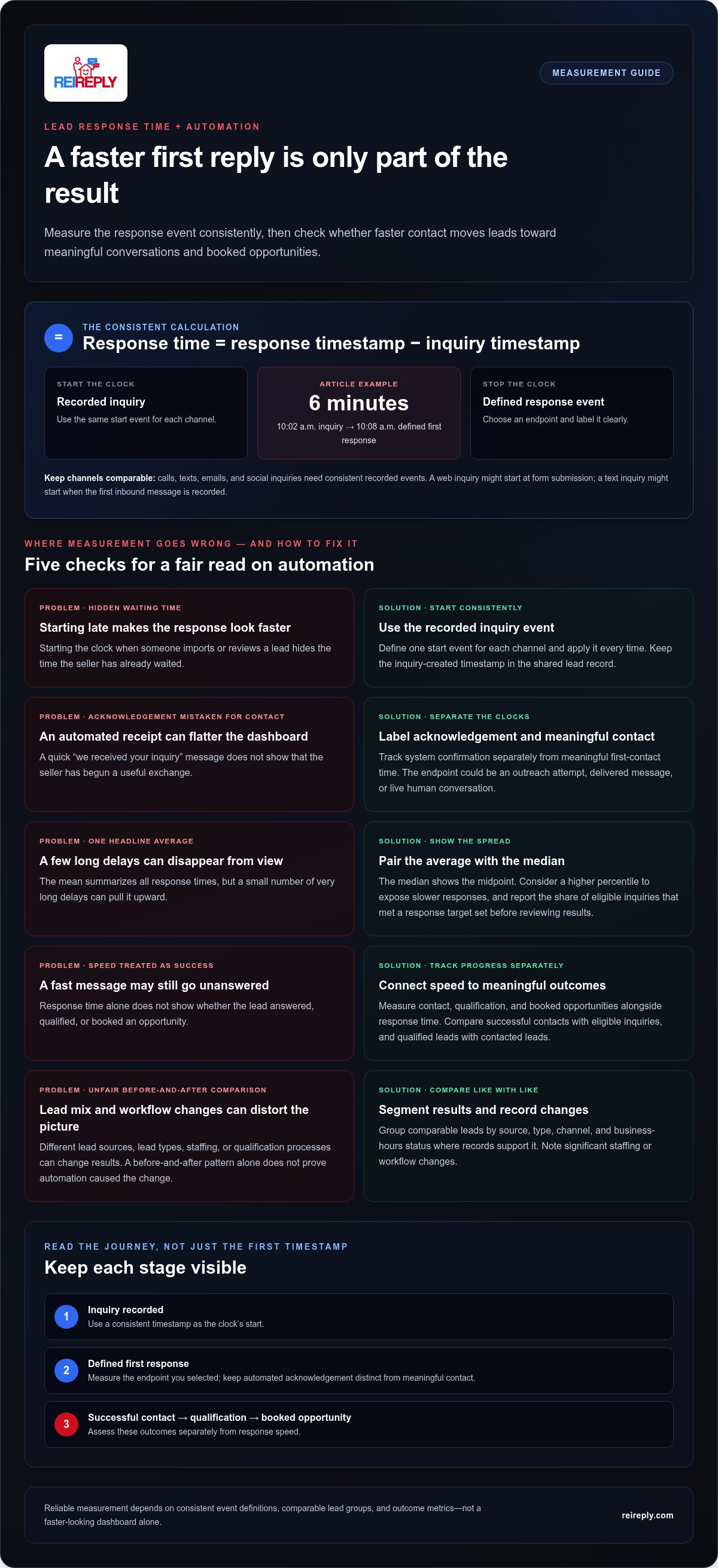
Lead response time is the elapsed time between a lead’s recorded inquiry and your defined first response. Consistent start and end points make comparisons meaningful rather than misleading. The broader idea of measuring the time between the start and completion of a process is also discussed in Lead Time (Wikipedia). For lead handling, precision matters: a clock that starts at form submission cannot be fairly compared with one that starts when someone manually enters the record later.
Response speed is only one part of performance. It doesn’t tell you whether the lead answered, whether the conversation established a fit, or whether an opportunity was booked. Treat response time as an operational signal, then assess contact rate, qualification, and downstream outcomes separately.
Which moments should start and stop the response clock?
Choose one start event for each channel and apply it consistently. A web inquiry might start when the form is submitted; a text inquiry might start when the first inbound message is recorded. Don’t start the clock when someone imports or reviews the lead, since that hides the time the seller has already waited.
Next, define the endpoint. It could be the first outreach attempt, a delivered message, or a live human conversation. These measure different stages, so label them clearly instead of blending them into one result. An automated “we received your inquiry” acknowledgement should not count as substantive contact unless it begins a useful exchange. Otherwise, the dashboard may show impressive speed while the seller still hasn’t received a meaningful response.
Why speed alone cannot prove better lead handling
A fast message can still go unanswered. A seller who responds may not meet your acquisition criteria. And a qualified conversation may not lead to a booked opportunity. Track each stage with its own denominator and time period. For example, compare successful contacts with eligible inquiries, then qualified leads with contacted leads. This shows where performance changes without confusing quick outreach with business impact.
Compare like with like. A shift in the mix of motivated-seller inquiries from different sources may change qualification rates even if response handling stays constant. Staffing changes or a revised qualification process can also affect later outcomes. Faster response may contribute to stronger engagement, but a before-and-after pattern alone doesn’t prove it caused the change. Record relevant workflow shifts, segment leads by source and type, and use the response metric to identify what to investigate next.
How to calculate lead response time across automated channels
Use the same calculation across every channel: response time = response timestamp − inquiry timestamp. If a seller submits a form at 10:02 a.m. and the defined first response occurs at 10:08 a.m., the response time is six minutes. The arithmetic is simple. Reliable results depend on recording the same kinds of events consistently for calls, texts, emails, and social inquiries.
Keep automated acknowledgement separate from meaningful first contact. An acknowledgement measures how quickly the system confirms receipt; meaningful first-contact time measures how quickly a real exchange begins. Both can be useful, but combining them can make the response metric look faster without showing whether the seller engaged. Research discussed in Harvard Business Review on Online Sales Leads helps explain why response speed deserves attention. Your own channel and outcome data should show how it performs in your process.
Create reliable timestamps for every inquiry
Keep the inquiry-created time and the timestamp for your chosen response event in a shared lead record. Store them in a consistent time zone, or convert them to one reporting standard, so records from different channels can be compared correctly. Capture the channel, lead source, lead type, and business-hours status where available. Decide how to handle duplicates: if the same seller submits a form and then texts, define whether those count as separate inquiries or one lead journey, and apply that rule throughout the report.
Choose metrics that explain the response-time result
The mean, or average, summarizes all recorded response times but can be pulled upward by a small number of very long delays. The median shows the midpoint, while percentiles reveal how long slower responses take. Report the median alongside the average, and consider a higher percentile to expose the long tail. Also show the share of eligible inquiries that met your defined response target. Set the target before reviewing results, then keep the rule consistent across comparison periods.
Segment the results instead of blending every lead path together. Compare response times by channel, source, lead type, and business-hours status when the records support it. Then pair speed with outcome measures:
- Contact rate: leads with a successful contact divided by eligible inquiries.
- Qualified-lead rate: leads meeting your qualification criteria divided by a stated group, such as contacted leads.
- Booked-opportunity rate: booked opportunities divided by a clearly defined group, such as qualified leads.
State each denominator and list exclusions, such as test records or duplicates, before comparing dashboards. Otherwise, a changed calculation can look like improvement. Centralized contact records and CRM integration can make channel-level analysis more consistent. REI Reply’s lead communication platform brings investor interactions across calls, texts, emails, and social channels into the lead-handling workflow.
How to tell whether faster response improves real estate lead outcomes
A shorter response time shows that the lead-handling process changed. It doesn’t, by itself, show that more sellers were reached, qualified, or moved toward a booked opportunity. Faster response is evidence of operational change, not proof of causation. To judge business impact, connect response-time patterns to lead quality and later milestones, then compare groups that are genuinely similar.
Build a comparison view that follows the lead journey. Keep measurement definitions steady across the before-and-after periods, and include the number of records behind each rate. Use the National Association of Realtors Research as a source of broader real estate context, not as a substitute for your own lead-level analysis.
Comparison framework
Response-time metric: Median first-response time and the share of eligible inquiries within your target. Show the distribution or response-time bands, not just a single average.
Lead-quality metric: Share of leads meeting the same qualification criteria, reported against a clearly stated denominator, such as contacted leads.
Downstream outcome: Share of qualified leads that book a next step, such as an acquisition conversation. Define the milestone consistently before comparing periods.
Compare like with like before drawing conclusions
Match comparisons by lead source, channel, lead type, and qualification rules. A change in the mix of motivated-seller inquiries can shift results even if the response process hasn’t changed. Separate business-hours and after-hours leads when conditions differ, and note seasonality, staffing levels, campaign changes, or process revisions. The goal is a fair read, not a flattering headline.
Look beyond the median. A team could improve its typical response time while leaving some inquiries waiting too long. Group leads into consistent response-time bands, then compare each band’s share of total inquiries before and after automation. Keep the band boundaries fixed between periods. If records are missing or timestamps are inconsistent, flag them rather than quietly excluding cases that could weaken the result.
Connect response speed to qualified conversations
Follow each lead through the same sequence: reached, qualified, and moved to a booked next step. Compare the proportion reaching each milestone across response-time bands, while keeping the lead source and type visible. For example, a faster band may show more booked conversations, but that pattern could also reflect stronger lead intent or a different campaign.
Small groups can swing sharply when only a few leads change status. Show the record count, identify missing outcomes, and treat unstable differences as signals to investigate, not confirmed lift. This is the core discipline behind measuring lead response time improvement with automation: connect faster handling to meaningful outcomes while keeping alternative explanations in view. If speed improves but qualification does not, investigate targeting or conversation quality. If qualification rises but booked next steps do not, examine what happens after the initial conversation.
A practical test for measuring automation’s response-time improvement
A useful test needs more than a launch date and a faster-looking dashboard. Set the rules before automation goes live, preserve them during the comparison, and inspect the underlying records. This makes measuring lead response time improvement with automation a repeatable operating process, not a one-time claim.
- Define: Lock the inquiry start event, response endpoint, eligible lead types, and qualification criteria. Keep system acknowledgements distinct from substantive contact.
- Baseline: Record current response-time patterns, channel and source mix, contact rates, qualification, and booked next steps.
- Automate: Apply the new workflow to the channels and lead segments you intend to evaluate. Record the launch date and any routing or handoff rules.
- Compare: Use the same definitions for the baseline and post-launch periods. Review response distributions and outcome rates, not only averages.
- Diagnose: Trace outliers and exceptions to the channel, lead source, routing, or handoff that may explain them.
- Refine: Adjust the workflow based on recurring evidence, then continue tracking with the same measurement rules.
Set a baseline and choose a fair comparison
Don’t choose a test window just because it fits a calendar. It should capture enough normal lead volume and source variation to make the comparison useful. Document the current channel mix, lead sources, response patterns, and outcome measures. Then note simultaneous changes, such as staffing, campaigns, qualification rules, or routing. If several changes happen at once, it becomes harder to isolate automation’s contribution.
Keep the response definition and qualification criteria stable throughout the test. If the team changes what counts as a qualified seller or moves the response endpoint from first attempt to live conversation, the before-and-after numbers no longer describe the same process. Evaluate an automated lead follow-up system against the workflow it replaces, not against a shifting scorecard. Choose a comparison window based on your actual lead volume and operating consistency, then disclose its limits.
Review exceptions and improve the workflow
After the comparison, inspect missed, duplicate, delayed, and incorrectly routed inquiries. Look for recurring failure points rather than treating every outlier as an isolated incident. Confirm that automated actions and human handoffs appear accurately in each lead record, with enough context to understand what happened and when. This review can show whether the workflow needs better routing, record handling, or follow-up logic.
Use the same discipline when revising automated lead follow up: change one part of the process where possible, then continue monitoring speed and downstream outcomes. That makes each refinement easier to assess. REI Reply brings investor lead interactions across calls, texts, emails, and social channels into one operational workflow. Explore REI Reply’s lead automation platform as you build a more measurable process.
How REI Reply supports measurable lead response automation
Measurement breaks down when a seller’s call sits in one tool, a text in another, and the contact record somewhere else. REI Reply provides an operational layer for real estate investors, bringing lead interactions across calls, texts, emails, and social channels together with contact management and CRM integration. This gives you a stronger foundation for reviewing how inquiries move through the process.
The platform’s AI agents handle interactions across those channels and support lead qualification and deal booking. AI voice agents handle inbound and outbound calls, while automatic contact management helps keep lead records organized. These capabilities don’t prove that response times or deal outcomes will improve. They give investors a way to implement a consistent workflow, then measure what happens using the definitions and outcome metrics established for their team.
Turn faster first contact into an observable workflow
When teams depend on manually checking separate inboxes and call queues, it can be difficult to see which inquiry arrived first, what response followed, or where a handoff stalled. Multi-channel handling brings lead interactions into a connected workflow, helping reduce that fragmentation. Investors can review interaction and contact records to examine timing, response attempts, handoffs, and progress toward qualification or a booked opportunity.
For useful analysis, make sure the events in the record match your measurement rules. If your metric ends at a first outreach attempt, distinguish that attempt from a seller reply. If it ends at meaningful contact, identify the exchange that qualifies. Consistent CRM records make these distinctions easier to inspect across lead sources and channels. For more detail on voice workflows, explore the guide to AI voice agents for real estate.
Use the measurement framework to decide what to improve
Review speed and outcomes side by side. A shorter median response time may indicate faster handling, while contact, qualification, and booked-opportunity indicators show whether leads are progressing. Break the findings down by channel, source, lead type, and operating conditions where records allow. This helps pinpoint whether a delay or drop-off is concentrated in a particular part of the process.
Automation should make the workflow more consistent, not end the investigation. Inspect exceptions, including inquiries that were missed, routed incorrectly, or left without a meaningful next step. Use those patterns to decide whether to adjust routing, message timing, qualification steps, or human handoffs. Then measure again using the same definitions. That’s how investors turn automation from a feature into an operating process they can evaluate.
Explore REI Reply’s investor-focused lead platform to see how connected communication and contact management can support a more measurable lead-handling workflow.
Turn measurement into your next operating advantage
Make measurement part of the way your team works, not a report you review once and forget. Use what the data reveals to choose one workflow issue to address, then keep checking whether the change improves consistency and meaningful seller engagement. Measuring lead response time improvement with automation becomes a tool for better decisions, not just a faster dashboard.
REI Reply supports investor lead handling with AI-powered calls, texts, emails, and social interactions, alongside automatic contact management and CRM integration. Live human support and training can help your team put the platform into practice and make its records useful for ongoing review. The goal is clearer visibility into how leads move through your process, with your team still assessing the outcomes.
Ready to make your lead workflow easier to measure? See how REI Reply can automate and organize investor lead conversations. Build a stronger process, learn from the results, and keep moving forward.
Frequently Asked Questions
What is a good lead response time for real estate leads?
A good response time is one your team can meet consistently while giving sellers a timely, useful next step. Set an operational target based on your lead volume, coverage, and channel capabilities, then assess how often you meet it. Don’t rely on a single industry benchmark as a universal pass-or-fail rule. A useful target exposes delays and helps your team act on them.
Does a faster automated response always increase lead conversion?
No. Faster automation can improve the timing of outreach, but it can’t guarantee that a seller answers, qualifies, or books a next step. A generic message may arrive quickly and still fail to address the seller’s situation. Review conversion by lead source and type, and check whether the message prompted a real exchange. Use the results to refine both timing and relevance rather than treating speed as proof of success.
Should an automated confirmation count as the first lead response?
Only if your reporting explicitly defines the metric as time to system acknowledgement. An automatic “we received your form” message, for example, confirms delivery but may not answer the seller’s question or begin qualification. Track acknowledgement and substantive engagement as separate events. That distinction shows whether the system confirms receipt promptly while a useful conversation still needs to happen.
How do you measure response time when a lead contacts you after hours?
Keep calendar elapsed time as the primary measure if you want to reflect the seller’s full wait. You can also calculate business-hours elapsed time as a separate operational view, using a clearly documented schedule. For example, label an inquiry received outside your staffed hours and record the first response according to your chosen endpoint. Don’t silently pause the clock or mix the two measures in one report.
Can lead response time be measured across calls, texts, email, and social media?
Yes, if each channel records the inquiry and response events consistently. A missed call, an outbound text, an email reply, and a social message may represent different actions, so define what qualifies as a response for each. Preserve the original channel in reporting. If a seller switches channels, link the interactions to the same lead journey where possible, while retaining timestamps for each contact.
How long should you measure lead response time before and after automation?
There’s no fixed number of days that works for every investor. Continue collecting data until each period includes enough inquiries to reflect normal lead volume and the mix of sources you’re evaluating. A low-volume team may need more calendar time than a high-volume team. Keep the observation windows comparable, and avoid firm conclusions if one period is dominated by an unusual campaign or a record-keeping gap.
Which lead outcomes should you track alongside response time?
Track whether the lead was reached, whether the conversation met your qualification criteria, and whether a defined next step was booked. When measuring lead response time improvement with automation, also note outcomes such as disqualification reasons or seller unavailability, which can explain why a quick response didn’t progress. Set the denominator for each rate, and review results by channel or source so a change in lead mix doesn’t distort the picture.


