
How to Switch Real Estate CRM Without Losing Leads
What if the biggest risk in a CRM switch isn’t the new software, but the follow-up gap between systems? If you’re figuring out how to switch real estate crm platforms, you need to protect more than contact records. Notes, tasks, lead ownership, property details, and conversation history all affect what happens next with an investor lead.
Don’t rush the import or assume every detail will carry over. A successful switch puts lead continuity first: assign clear migration ownership and keep active follow-up moving while you test the new system. That takes a plan, not guesswork.
This guide lays out a staged migration plan: audit and clean your data, map fields and workflows, test records and user access, then cut over with a fallback plan. You’ll learn how to preserve contact history, check that key details transfer accurately, and keep your team focused on live leads throughout the change. The goal is a cleaner CRM workflow without leaving promising conversations behind.
Key Takeaways
- Learn how to switch real estate crm systems while keeping lead ownership and next actions clear at every stage.
- Use a pre-migration audit to separate active investor records from duplicates, stale contacts, and incomplete entries.
- Choose between rebuilding and transferring data based on your workflow, then document where each field belongs.
- Prevent updates from splitting across platforms by assigning one system of record during each cutover stage.
- Use the transition to shape the new CRM around investor contact management and consistent follow-up.
How to Switch Real Estate CRM Without Putting Active Leads at Risk
A CRM change without a clear plan can obscure who owns a lead, what’s already been discussed, and what needs to happen next. A seller may have shared property details by text, received a call from another team member, and still be waiting for a promised follow-up. If you move systems without carrying over that context, the conversation can stall.
A successful switch means more than importing records into a new interface. Contact and property details must remain accurate, follow-up must continue, and each team member must know who owns the next action. CRM systems organize customer relationships and related processes; What is Customer Relationship Management (CRM)? offers a useful foundation. You don’t need to rebuild your entire investment business to change software. Keep effective acquisition and disposition processes intact while addressing the parts of the system that create friction.
A migration may make sense when lead information is fragmented across tools, handoffs depend on manual reminders, or managers can’t see recent activity and upcoming tasks in one place. But don’t assume the CRM is always the problem. Delayed responses can also stem from unclear ownership, inconsistent team training, or a workflow with too many steps. Identify the cause before deciding what to change.
What signals that your real estate CRM has become a bottleneck?
Look for operational clues: duplicate contacts with separate conversation histories, seller messages scattered across inboxes and phones, or leads without a clear owner. If a team member can’t quickly tell whether a property owner was called, what they said, and who follows up next, the process is hiding useful information. Searching multiple places or asking around before responding can delay follow-up. Treat that friction as something to investigate, not proof that a new platform alone will fix everything.
Separate software limitations from workflow and training issues. If the CRM can record tasks but the team doesn’t assign them, clarify the handoff before migrating. If important interactions can’t be tracked where the team works, that may point to a system gap.
What should a successful CRM switch protect?
Protect the context your team needs to act: contact details, property information, interaction history, open tasks, and assigned owners. For every active opportunity, define a specific next step, such as returning a seller’s call or reviewing property details, and name the person responsible. Don’t leave that information buried in a note no one knows to check.
The goal is to preserve usable context, not just move rows of data. A record that arrives without its conversation history or next action may be technically present but operationally incomplete. Make lead continuity the standard for the switch. That’s how to switch real estate crm systems without confusing a software change with a full business overhaul.
Audit Your Investor Workflow Before Moving Real Estate CRM Data
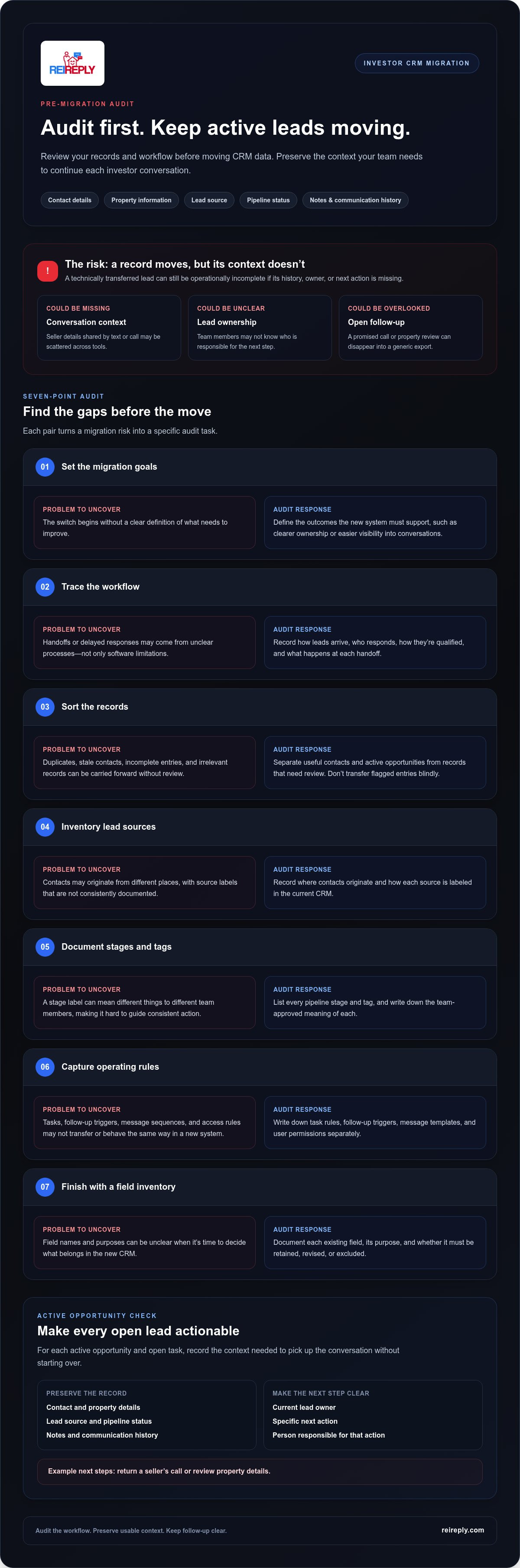
Before deciding how to switch real estate crm systems, get a clear picture of what your current CRM holds and how your team uses it. A disciplined audit helps protect active opportunities, avoid carrying clutter forward, and distinguish software gaps from workflow problems. For broader context on evaluating platforms and features, see Choosing the Best Real Estate CRM.
Which real estate lead data should you review first?
Start with the information someone needs to pick up a conversation without starting over: contact details, property information, lead source, pipeline status, notes, and communication history. Flag duplicates, incomplete records, and outdated entries for review rather than transferring them blindly. Identify each active opportunity and open task, then record its current owner and next action. A seller waiting for a property-related follow-up should never disappear into a generic export.
Use this numbered audit before migration:
- Set goals. Define what the new system must improve, such as clearer ownership or easier visibility into conversations.
- Trace the workflow. Note how leads arrive, who responds, how they’re qualified, and what happens at each handoff.
- Sort the records. Separate useful contacts and active opportunities from stale, duplicated, incomplete, or irrelevant entries.
- Inventory lead sources. Record where contacts originate and how each source is labeled.
- Document stages and tags. List pipeline stages and tags, and write down what each means to your team.
- Capture operating rules. Write down task rules, follow-up triggers, message templates, and user permissions.
- Finish with a field inventory. Document every existing field, its purpose, and whether it must be retained, revised, or excluded.
How do you map existing stages and automations?
Give each pipeline stage a team-approved definition. If “Contacted” means one call to one person for one team member but only a full conversation for another, the label won’t guide consistent action. Record triggers and message sequences separately. Don’t assume they’ll transfer or behave the same way in a new system.
Assign one decision-maker to approve field names, access roles, and workflow changes. That person can resolve competing preferences before they turn into confusing rules in the new CRM. For a focused review of platform choices, consult the published Choosing the Best CRM for Real Estate Investors guide. If your audit points to disconnected contact management and follow-up, explore REI Reply’s investor contact management platform.
Plan the CRM Data Transfer: Fields, Tests, and Lead Continuity
Once you’ve audited your workflow, decide what should move and how each record will make sense in the new system. A clean-slate rebuild can simplify a cluttered setup, but it may leave useful history behind. A structured transfer preserves more context, but requires careful field mapping and validation. Choose based on what your team needs to manage active leads with confidence.
| Approach | Trade-off | Best fit |
|---|---|---|
| Clean-slate rebuild | Creates a simpler structure, but historical context may need to be reviewed and entered selectively. | When the old setup is cluttered and only a defined set of current records and workflows should continue. |
| Structured transfer | Preserves more existing data, but mismatched fields and duplicate records need deliberate handling. | When notes, activity history, ownership, and open tasks matter to ongoing conversations. |
How do you map contacts, properties, and conversation history?
Build a field map before transferring anything. For every source field, name its destination or document why it won’t be carried over. This prevents useful context from disappearing because the new system uses different labels.
| Source field | Destination field | Action |
|---|---|---|
| Seller phone | Contact phone | Map it and check that the number remains attached to the correct person. |
| Property address | Property address | Map it and confirm it stays connected to the right contact or opportunity. |
| Call and text notes | Interaction history or notes | Map them where readable; preserve context that informs the next seller conversation. |
| Unused custom field | No direct match | Archive it for reference or leave it behind with a documented reason. |
For fields without a direct match, choose deliberately: map them to an equivalent, archive them for reference, or exclude them because they no longer support the workflow. Document the decision. “We’ll figure it out later” is how important seller context gets lost.
What should you test before transferring everything?
Run a small test transfer first. Review a mix of active and older records, then check that contact details are complete, notes remain readable, owners are correct, and property-to-contact relationships still make sense. Confirm duplicates are handled as intended and key tasks remain visible with their next actions intact.
Log every exception, such as a missing note or a field landing in the wrong place. Correct the mapping, then repeat the checks before approving the full transfer. This sequence is central to how to switch real estate crm systems without sacrificing lead continuity for a cleaner setup.
Cut Over to the New CRM Without Dropping Follow-Up
The transfer is only one part of the change. A controlled cutover tells every team member where to record activity, who owns each active opportunity, and how to flag problems. Without those rules, one person may update the old CRM while another logs a seller conversation in the new one. The result: split records, conflicting next steps, and avoidable follow-up gaps.
Set a clear changeover point and communicate it before the switch. Define one system of record for each stage: the old CRM remains authoritative until the transfer begins; during the transfer, users follow the migration lead’s instructions; after validation, the new CRM becomes the place for all new activity. Avoid parallel updates unless a specific exception process assigns responsibility for reconciling them.
How should you manage the transition window?
Use a simple sequence: communicate the change, pause conflicting edits, transfer the approved records, validate them, then resume normal follow-up in the new system. Before the pause, capture current owners, due tasks, and next actions for active leads. Assign one person to monitor those opportunities and unresolved migration exceptions, so urgent seller conversations don’t get lost in general troubleshooting.
Review automations before they run in both systems. Overlapping triggers could send duplicate messages or create uncertainty about who should respond. Pause or control them during the transition unless their triggers and responsibilities are clear. For additional ideas on maintaining consistent investor follow-up, see Automated Lead Follow Up System: The Investor’s Guide to Market Dominance.
How do you validate the new CRM after cutover?
Don’t treat a completed transfer as proof that the new workflow is ready. Review a representative sample across lead stages, sources, assigned owners, notes, and pending tasks. Confirm that each record gives its owner enough context to take the next step, and that follow-up tasks are visible where the team expects them.
Ask users to complete routine actions in the new system, such as locating a seller, reviewing a prior conversation, and recording a follow-up task. Give them one channel for reporting blockers. Log missing records, unclear fields, and workflow issues in a correction list. Prioritize problems that could interrupt an active lead’s next action, then assign an owner to resolve each one.
A disciplined cutover keeps responsibility clear from the first record through final validation. If you’re ready to bring investor contact management and follow-up into a unified platform, explore REI Reply’s investor contact center platform.
Make the New Real Estate CRM Work as an Investor Command Center
A migration isn’t complete just because the records are in the new system. Your team needs to find contact and property details, understand the latest interaction, and carry out follow-up in the new workflow. If people still rely on separate tools or old workarounds to manage investor leads, the changeover hasn’t yet delivered a usable command center.
Walk through common team tasks: review a lead’s conversation history, qualify an inquiry, assign the next action, and track progress toward a deal. Note where information is still split across platforms and tighten those handoffs. Then check whether the team is using the new process, not just whether the data is present.
How can a unified platform simplify investor follow-up?
Separate outreach tools can add handoffs: a call happens in one place, a text in another, and the next task lives somewhere else. A unified contact center can bring investor interactions across calls, texts, email, and social media into a more connected workflow. This helps the team follow the path from first contact to next action.
REI Reply is an AI-powered marketing and contact center platform built for real estate investors. Its AI voice agents handle inbound and outbound interactions, while lead qualification and deal-booking automation support the path from response to next step. Explore the AI Voice Agent for Real Estate: The 2026 Guide to Market Dominance for more on AI voice agents in investor follow-up.
What should your team measure after the CRM switch?
Review the workflow regularly to spot friction early. Track whether key contact and property fields are complete, how many follow-up tasks are overdue, and whether team members follow the same response and ownership process. Check adoption through practical signals: are people recording conversations, updating lead status, and assigning clear next actions in the new workflow?
Review lead qualification and deal-booking steps as well. Look for missed handoffs, unclear statuses, or records that stall without an owner. These checks won’t guarantee a particular business result, but they show where the process needs attention and give the team a concrete basis for improvement.
Choose a platform that supports the way your investor team handles contact and follow-up. See how REI Reply powers investor follow-up.
Make Your CRM Switch the Start of Stronger Follow-Up
Knowing how to switch real estate crm systems comes down to disciplined execution: audit the workflow before moving data, map fields and test records before a full transfer, then give your team one clear system of record during cutover. The real finish line isn’t a completed migration. It’s a team that can manage investor contacts and keep follow-up moving in the new workflow.
If your transition is also a chance to simplify disconnected outreach, REI Reply offers an AI-powered contact center designed for real estate investors, with interactions across calls, texts, email, and social media. Live human support and training can help your team get oriented as it builds new routines.
Ready to bring investor contact management and follow-up into one platform? See how REI Reply powers investor follow-up. With a clear plan and the right workflow, you can move forward confidently and keep your team focused on the leads that matter.
Frequently Asked Questions
How do I switch real estate CRMs without losing leads?
A reliable plan for how to switch real estate CRM systems starts with listing active records, open tasks, and assigned owners. Map source fields to destination fields, then test a small sample for readable notes, correct contact and property relationships, and visible next actions. Set a clear cutover point and tell the team where to log new activity. After the move, review active opportunities and assign someone to resolve missing or mismatched information.
What data should I migrate to a new real estate CRM?
Prioritize contact details, property context, lead sources, pipeline stages, notes, communication history, assigned owners, and open tasks. These details help the team understand each opportunity and take the next step. Review duplicates and incomplete records before transferring them. For every field, document what it means and decide whether it should move, be archived for reference, or be excluded. The right scope depends on what your team needs to manage follow-up.
How long does it take to switch a real estate CRM?
There’s no reliable universal timeline for a CRM switch. The effort depends on record volume, data quality, workflow complexity, team size, and the transfer method. An audit and small test can reveal cleanup or mapping issues before the main move. Plan around active follow-up, not just software setup. Set a cutover date only after the team understands its responsibilities and you’ve defined how to validate records and handle exceptions.
Can I keep my old CRM during migration?
Yes, keeping the old CRM available temporarily can help your team reference historical information and validate transferred records. Set clear rules: decide which system is authoritative at each stage and when the old one stops receiving new activity. If users update both systems without a reconciliation process, records can diverge. Tell the team where to log calls, messages, notes, and tasks during the transition, and preserve access to necessary history.
What should I test before switching to a new CRM?
Test representative records across lead stages and sources. Confirm that contact and property details, notes, assigned owners, and open tasks appear where expected and remain easy to find. Check that duplicates are handled as intended and property records stay connected to the right contacts. Ask users to complete routine actions, such as reviewing a conversation and assigning a follow-up task. Log errors, correct the field mapping, and retest before the broader transfer.
How do I keep seller follow-up running during a CRM migration?
Before the changeover, list active leads with their assigned owners and next actions. Tell the team where to enter new calls, texts, and notes at each stage, and identify one migration owner to resolve exceptions. Review due tasks regularly during the transition and verify that completed actions appear in the new system. Avoid overlapping automations unless the triggers and responsibilities are clear, so sellers don’t receive duplicate messages or miss a follow-up.
Should I switch to an all-in-one real estate CRM?
An all-in-one platform may help if contact management, outreach, and lead qualification currently sit in separate tools and create extra handoffs. Start by identifying the workflows your team actually uses, then consider whether a unified setup can support them. REI Reply is an AI-powered marketing and contact center platform built for real estate investors, supporting interactions across calls, texts, email, and social media, alongside AI voice agents and lead qualification. The goal is a coherent workflow, not extra complexity.


