
Automated Lead Capture from Ads for Real Estate Investors
What good is an ad lead if it lands in the wrong inbox, waits hours for a reply, or never reaches your dealmaker? Automated lead capture from ads for investors is about more than collecting names. It’s about turning responses from forms, calls, texts, and social channels into organized contacts your team can actually work.
Ads can attract seller interest, but the work doesn’t stop when someone responds. Your team needs to capture each inquiry consistently, qualify it before it reaches the dealmaker, and identify which campaigns lead to meaningful conversations, not just form submissions. Manual entry and delayed follow-up leave room for promising opportunities to slip through.
This article shows how to build a clear path from ad response to trackable pipeline, and where AI can reduce manual handoffs. You’ll see how contact management, AI voice agents, and multi-channel communication can support qualification and booking, plus what to verify about ad-platform connections, data flows, and campaign attribution. The goal is a clearer view of every inquiry and a more reliable process for acting on the ones that matter.
Key Takeaways
- Automated lead capture from ads for investors works best when each response follows a defined path into an organized contact record.
- Separate submitted inquiries from qualified opportunities so your team knows which leads are ready for a dealmaker.
- Evaluate capture workflows by record completeness, source visibility, routing, qualification, and team oversight, not just form volume.
- Start with one campaign, map its owner and next action, then test the full workflow before expanding it.
- AI contact handling can help manage calls and other channels, but verify ad-platform connections and data flows before relying on them.
What Automated Lead Capture from Ads Means for Real Estate Investors
Ads create opportunities to start a conversation. Capture turns a response into a record your team can act on. Automated lead capture from ads for investors means collecting and organizing a prospect’s response with minimal manual entry, so the inquiry has a clear place in your follow-up process.
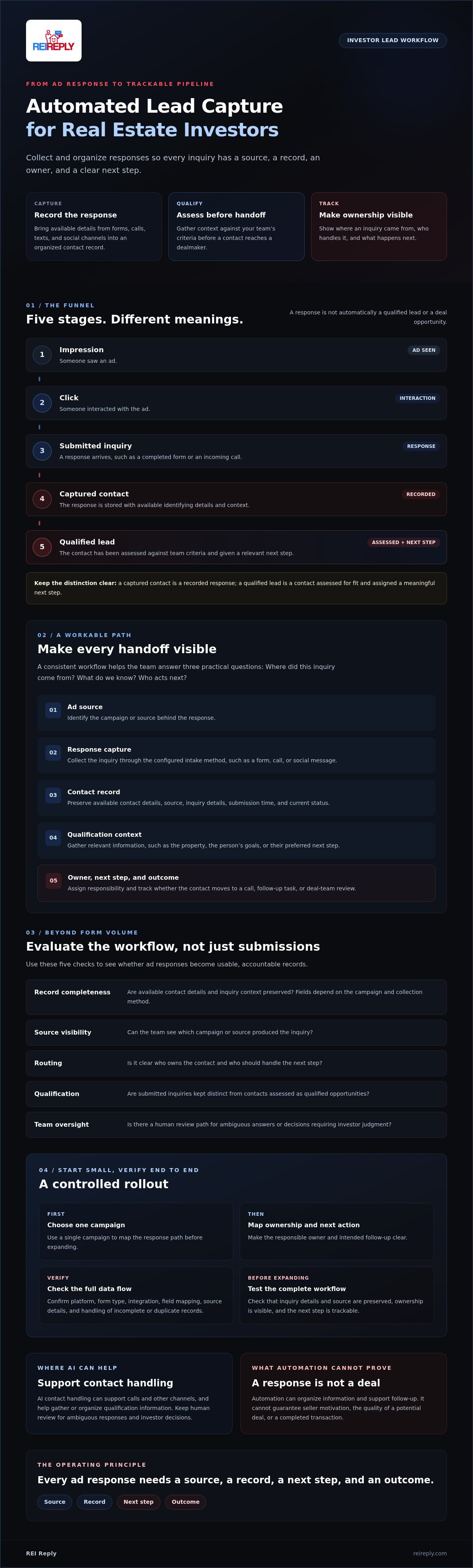
The process starts before a lead record exists. An impression means someone saw an ad; a click means they interacted with it. A submitted inquiry is a response, such as a completed form or an incoming call. A captured contact is that response recorded with available identifying details. A qualified lead has also been assessed against your team’s criteria and given a relevant next step.
These stages matter because activity at the top of the funnel doesn’t prove that a contact is reachable, motivated, or a fit for a deal. Online advertising includes varied formats and placements, so the path from ad to response can differ. Automation can organize information and support follow-up, but it can’t guarantee a seller’s motivation, the quality of a potential deal, or a completed transaction.
What counts as a captured real estate lead?
A captured lead may come from a website form, an incoming call, or a social message. A useful record goes beyond a name: it may include available contact details, the inquiry source, the message or stated interest, and the date of the interaction. That context helps your team choose an appropriate follow-up instead of treating every response the same way.
Available fields depend on the campaign and configured collection method. A short form may provide only basic contact information, while a call or message may reveal different details. Don’t assume every ad channel passes the same data. Define what your team needs, then check which fields the intake method can capture and preserve.
Why does the path from ad to contact matter?
When responses land in disconnected inboxes or are re-entered by hand, ownership can become unclear. A contact may be missed, duplicated, or left without an obvious next action. A consistent record helps the team see where an inquiry came from, its current status, who should handle it, and what should happen next.
A captured contact is a recorded response; a qualified lead is a contact assessed for fit and assigned a meaningful next step. That distinction keeps campaign reporting grounded. Teams can separate the number of responses from the number of conversations that merit a dealmaker’s attention, without treating automation as proof of an opportunity.
How Ad Responses Become Organized Investor Leads
A reliable workflow makes every handoff visible. It starts with the ad source, captures the response, creates or updates a contact record, gathers qualification context, assigns an owner, and tracks the outcome. Each stage should answer a practical question: Where did this inquiry come from? What do we know? Who acts next?
Every ad response needs a source, a record, a next step, and an outcome. That sequence gives the team a process to review without confusing a submitted inquiry with a deal opportunity. For a broader view of the building blocks, see Forbes’ The Ultimate Guide to Online Lead Generation.
From ad response to a usable contact record
A submitted form or inbound interaction can become a contact record when the intake method passes its available information into a contact-management system. Useful fields include the campaign or source, submission time, inquiry details, contact information, and current status. Together, these fields help the team understand what came in and avoid treating an unanswered inquiry as a completed conversation.
Ad platforms don’t all send the same fields or support the same connection options. Verify the specific platform, form type, integration, and field mapping before relying on automated transfer. Test whether the record preserves the original inquiry details and source, then decide how your team will handle incomplete information or duplicate contacts.
From captured contact to qualified opportunity
Qualification means gathering relevant context, not automatically labeling someone motivated or a deal fit. A follow-up conversation might clarify the property, the person’s goals, or their preferred next step. Based on your team’s criteria, the contact can then move to a call, a follow-up task, or deal-team review. Keep a human review path for ambiguous answers or decisions that require investor judgment.
AI can support contact handling across channels and help gather or organize qualification information, while team members review the context and decide what happens next. Confirm supported channels, data flow, and routing behavior rather than assuming every handoff is automatic. For more detail on structuring ongoing nurture, read the automated lead follow-up system guide.
Automated lead capture from ads for investors becomes useful when the team can trace an inquiry from source to outcome. Review whether it was contacted, qualified, assigned, advanced, or closed out. That visibility helps separate campaign activity from meaningful conversations and gives the team a clearer basis for improving its process. If you’re evaluating a connected approach, explore REI Reply’s investor-focused contact handling.
How to Evaluate Ad Lead Capture Beyond Form Submissions
A full inbox isn’t proof of a healthy pipeline. To evaluate Automated lead capture from ads for investors, look past clicks and form counts. Ask whether each response becomes a complete, traceable record, reaches an owner, receives consistent qualification, and leads to a documented next step.
Use this comparison to see what your current process handles well and where it needs attention. CRM connections, routing, and AI capabilities depend on the tools, integrations, and setup in place.
| Approach | What it supports | What to watch |
|---|---|---|
| Manual inbox handling | Staff review and enter inquiries from available channels. | Ownership, complete records, and status updates depend on consistent staff follow-through. |
| Basic form notifications | Alerts a team when a form is submitted. | An alert alone may not create a shared contact record, assign an owner, or track what happens next. |
| CRM-connected capture | Can place inquiry details in a shared record when the connection and field mapping are configured. | Verify source details, field accuracy, duplicate handling, and assignment behavior. |
| AI-assisted contact handling | May support interactions, gather context, and organize information across supported channels. | Confirm channel support and human review paths. AI can assist intake, not make the dealmaker’s judgment. |
Which lead-capture approach fits your operation?
Manual handling may suit a low inquiry volume when staff have capacity to monitor channels and update records reliably. As the team and response load grow, shared contact records, clear assignment rules, and consistent status updates become more important. AI assistance can help manage calls or other interactions, but it shouldn’t replace review of seller context, property fit, or deal decisions. For more on AI-assisted calls, see this AI voice agent guide for real estate.
What should investors measure after capture?
Track a small set of defined measures: source, contactability, qualification outcome, follow-up status, and booked conversations. Specify what each means before comparing campaigns. For example, decide whether “contactable” means valid details or a successful interaction, and what criteria qualify an inquiry for deal-team review.
Clicks and submissions show activity, not closed deals. Review them alongside downstream outcomes, using the same definitions across campaigns. This gives investors a clearer view of which sources produce conversations worth pursuing, where follow-up stalls, and what the team should improve next.
How to Build an Ad-to-Lead Workflow Investors Can Manage
Build one dependable path before connecting every campaign. For your first campaign, document four things: the ad source, where each response should be recorded, who owns it, and the next action the team should take. This simple map exposes gaps before they multiply across channels.
A practical setup checklist for the first campaign
- Confirm the intake path. Identify how the campaign collects inquiries and where each response should appear. Verify the ad platform, form type, integration, and field mapping instead of assuming they’re supported.
- Name an accountable owner. Assign responsibility for reviewing new records and define who handles incomplete or unqualified inquiries. Specify whether those records need another review, a follow-up task, or no further action.
- Protect the workflow. Check who can access contact records and review data-retention settings before launch. Confirm that the configured process matches your team’s policies.
- Set exception rules. Decide how to flag likely duplicates, invalid or unavailable contact details, and inquiries that need human judgment. A clear exception path prevents automation from silently pushing uncertain records forward.
Before collecting or contacting leads, confirm the relevant advertising-platform policies and communication requirements for your campaign and channels. Requirements can depend on the circumstances. Consult qualified counsel for guidance on consent, contact practices, and applicable rules rather than relying on a workflow setting as a compliance decision.
How to test and improve the workflow
Run a test inquiry through the entire path before scaling. Check whether the record arrives in the intended destination, retains campaign context, and shows the right contact details and status. Confirm that the right person receives the notification and that assignment and follow-up behave as expected. Correct field-mapping or access problems before adding more traffic.
Then ask the people who will use the process to review it. Can they identify the inquiry’s source, see what has happened, and tell what to do next? Test edge cases too, such as a duplicate submission or missing contact detail. Record the expected result and compare it with what the system actually did.
Improve deliberately. Change one process element at a time, such as a field, assignment rule, or qualification question, then note whether it affects record accuracy, follow-up status, or qualified conversations. This makes cause and effect easier to assess than changing several settings at once.
A workflow is only useful if the team can operate and review it. To explore an investor-focused platform for connecting ad inquiries with contact handling, review REI Reply’s capabilities.
Where REI Reply Fits in an Investor’s Automated Ad Lead Workflow
REI Reply is an AI-powered marketing and contact center platform built for real estate investors. Its offerings include an AI Ads Platform, AI voice agents, multi-channel interactions, contact management, lead qualification, and CRM integration. In an automated lead capture from ads for investors workflow, these tools can support the steps after an inquiry arrives, from organizing contact information to handling conversations and reviewing qualification context.
REI Reply is available through its $99-per-month plan, though specific AI technologies may require a minimum plan level. Connections also matter. The platform supports calls, texts, emails, and social media interactions, but that doesn’t mean every ad source or form connects to every channel automatically. Confirm supported sources, integrations, data fields, and routing options for your intended setup.
How AI contact handling can support captured inquiries
AI voice agents can support inbound and outbound calls, depending on the verified configuration and workflow. They can help handle conversations and gather context, while a human team member remains responsible for reviewing uncertain responses and making deal decisions. For call-specific details, read the AI voice agent guide for real estate.
Text, email, and social interactions can also be part of a connected contact-handling process. Confirm which channels are enabled for your plan and how each inquiry reaches the right record. Don’t assume a social ad response, for example, automatically appears in a particular channel or CRM without checking the actual connection.
Questions to resolve before choosing a platform
Before making a decision, map your workflow and ask specific questions:
- Which ad sources and lead forms are currently supported?
- Which CRM connections are available, and what contact fields transfer?
- What access is included with the plan you’re considering?
- What onboarding, live human support, or training is available?
- Are there usage requirements for calls or messages to account for?
Get clear answers before purchase, then test the proposed data flow against your campaign process. If you’ve mapped your needs, explore REI Reply and compare its capabilities against your criteria. For a closer look at how the platform may fit an investor’s workflow, review the REI Reply platform overview.
Turn Ad Responses Into a Pipeline Your Team Can Act On
Strong automated lead capture from ads for investors connects each response to a clear next step. Track the journey from source to contact record, qualification, assignment, and outcome. Measure meaningful conversations and follow-up progress, not just clicks or form submissions.
Start with one campaign. Confirm how inquiries enter your system, who owns them, and how exceptions receive human review. Test the complete workflow before expanding it. Automation can organize contact handling, but your team still decides whether an inquiry fits its investment criteria.
REI Reply is built specifically for real estate investors, combining AI voice agents and multi-channel interaction capabilities with automatic contact management, CRM integration, and live human support and training. Confirm the ad connections and setup details that matter to your workflow.
Map your lead workflow, then explore REI Reply. With a clear process and the right checks in place, you can give every ad response a more reliable path forward.
Frequently Asked Questions
What is automated lead capture from ads for real estate investors?
It’s a workflow that collects an inquiry from an advertising campaign and organizes it as a contact record with useful source and status information. Depending on the setup, the workflow may also support qualification, assignment, and follow-up tasks. A captured contact isn’t automatically a qualified seller, and automation can’t guarantee a deal. Before relying on a platform, confirm which collection methods and integrations it supports for your campaigns.
How do investors capture leads from online ads automatically?
Start by identifying how the campaign collects responses, such as through a website form or an available ad-platform form. Then confirm how each response reaches your contact-management system, which fields are retained, and who receives the inquiry. Test the entire path with a sample submission before launch. Setup varies by platform and software, so verify supported connections instead of assuming every source syncs automatically.
Can AI qualify real estate leads from ads?
AI can support initial conversations by responding to inquiries, collecting relevant context, or routing a contact for review when the configured system supports those tasks. Investors should define qualification criteria and keep important details available for human review. An automated interaction can’t independently confirm a property’s condition, a seller’s intent, or deal viability. Treat AI as a process aid, not a guarantee of lead quality or a replacement for deal judgment.
What information should an ad lead capture system record?
Useful records can include available contact details, campaign source, inquiry content, submission time, current status, and the responsible team member. Capture the information your workflow needs, and confirm how the system handles consent and access. Available fields depend on the campaign and integration. Before launch, test sample records to check that essential context arrives accurately, stays connected to the right inquiry, and can be reviewed by the appropriate team members.
Do I need a CRM to capture leads from real estate ads?
Not necessarily, but you do need a dependable place to organize contacts, preserve campaign context, assign responsibility, and track next steps. That may be a CRM or a platform with contact-management capabilities. Choose a setup that fits how your team works and confirm which integrations it supports. Avoid extra tools or disconnected inboxes that lead to duplicate records, unclear ownership, or inquiries without a documented next action.
How can I tell whether my ad lead capture workflow is working?
Review the path from campaign source to contact record, follow-up, qualification outcome, and booked conversation. Look for missing fields, duplicates, unclear ownership, and handoffs that don’t happen as intended. Compare campaigns using the same definitions, and distinguish clicks and submissions from qualified conversations and completed deals. These measures can reveal process gaps and guide improvements, but they don’t prove automation alone caused a particular business outcome.
Is automated messaging to ad leads subject to rules?
Requirements may depend on the communication channel, message, how contact information was collected, and applicable platform policies. Don’t assume that submitting an inquiry permits every type of later communication. Document how consent is obtained, check the relevant platform rules, and consult qualified legal counsel about requirements for your circumstances before launching calls, texts, or emails. Also confirm that your process can record and appropriately handle contact preferences and requests.


